Turn every company page into a support channel
Add live chat, ticket fallback, and an agent console to your 5thir portfolio. Help visitors instantly, capture missed conversations, and manage support from one branded workspace.
Register your company page and turn on chat support
Sign in, complete your member profile, confirm your company identity, and add the details needed to create your 5thir company page. An active 5thir package, including the free package, is required before your company admin portfolio can be accessed.
- Your name, title, mobile number, and country are saved to your 5thir member profile.
- The company page is created only after the final details step.
- If your package is active, you’ll be redirected to your company admin portfolio.
Company page setup
Free package or higher required before activation.
Verify your account
Sign in with Google, or request a security code using your 5thir account email.
Personal details
Complete the member profile that owns and manages this company page.
Company identity
Add the basic company information that will be tied to the chat widget setup.
Company details
Add the location and profile information needed to create the company page.
Let visitors reach your team without leaving the company page
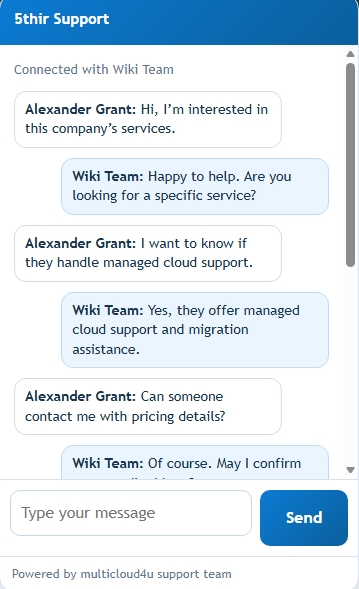
5thir Chat Widget helps every company page capture visitor questions, start real-time conversations with available agents, and convert missed chats into trackable support tickets.
Free tier includes the chat widget, live chat when agents are online, and ticket fallback when they are offline.
Open the door to better company-page support
Built for 5thir company pages
Support tools designed around your company portfolio, visitor questions, and agent workflow.
Live Availability
Show visitors when your team is online and ready to respond in real time.
Ticket Fallback
Capture requests as tickets when no agent is available, so every question is saved.
Chat Queue
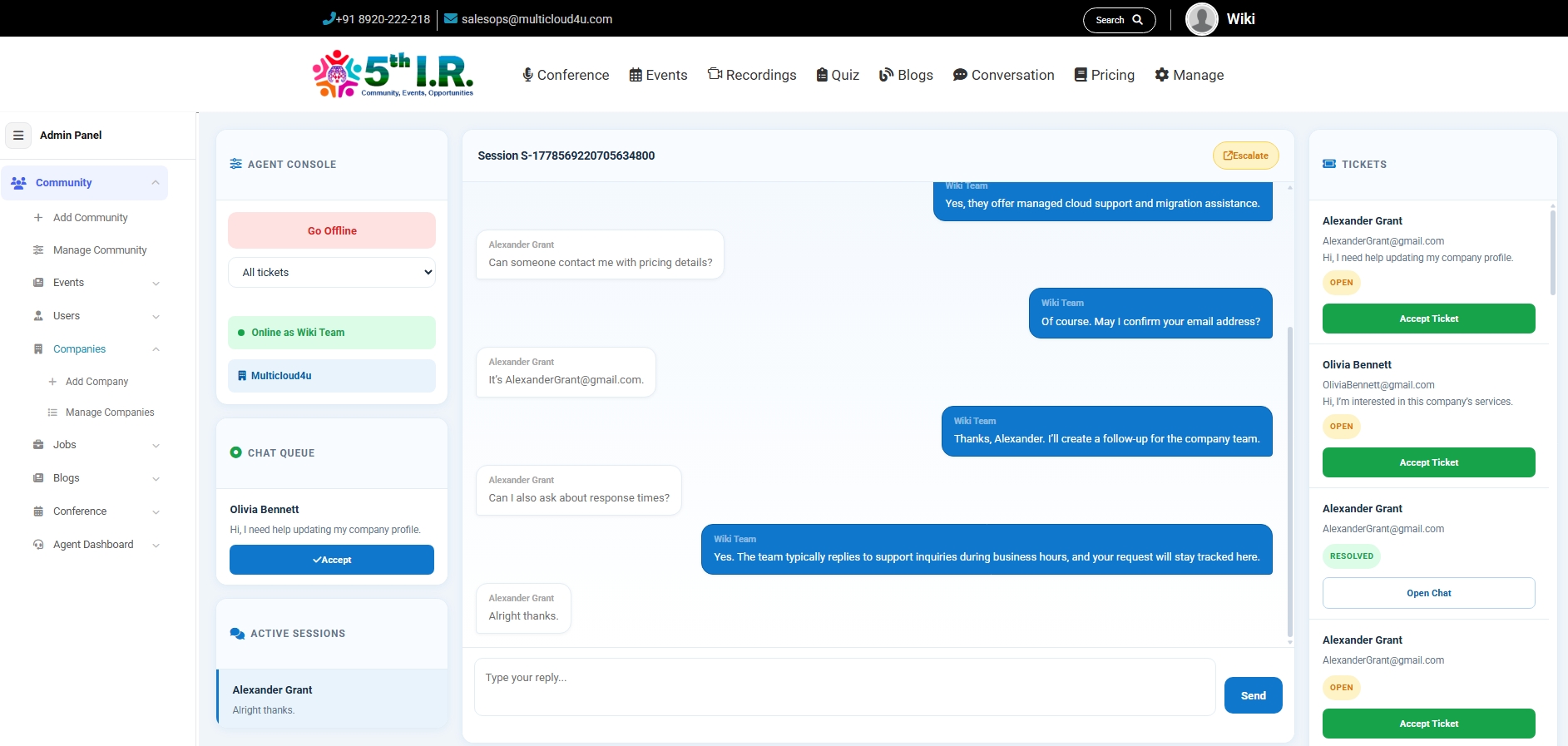
Let agents accept incoming chats from a queue instead of random assignment.
Conversation History
Keep live chats, ticket status, and follow-up context in one support dashboard.
AI-ready Workflow
Designed to support future AI-assisted summaries, ticket tagging, and suggested replies as your support process grows.
Turn important chats into trackable tickets
Keep support moving even when a question needs follow-up
When a visitor's question cannot be resolved immediately, agents can escalate the conversation into a ticket. The request stays connected to the original chat, so the customer does not have to explain the issue again.
Future AI assistance can help turn escalated chats into clear ticket summaries, suggested next steps, and cleaner follow-up notes for agents.
Install in minutes
Add the 5thir Chat Widget to a company portfolio page by including the widget stylesheet, setting the company configuration, and loading the widget script.
Get started for free
  <script>
    window.ChatWidgetConfig = {
      apiBase: "https://...com",
      companyId: "COMPANY_ID",
      brand: "5thir Support",
      accent: "#0b7bd3"
    };
  </script>
Replace COMPANY_ID with the company's 5thir company ID. Once added, the widget can identify the company page, apply the support brand, and open live chat or ticket fallback.
A seamless support experience
From the first question to a resolved ticket, the widget keeps visitors and agents in the same flow.
Visitor starts a conversation
A visitor opens the widget from a company portfolio page and sends their question.
Agent accepts from the queue
Online agents can see incoming requests and explicitly accept the chat.
Offline requests become tickets
When no agent is online, the widget captures the visitor's details and message as a ticket.
Tickets move toward resolution
Agents can track open, in-progress, and resolved tickets from the dashboard.
Chat support grows with your 5thir package
Every company page gets access to the 5thir Chat Widget. Live chats are available when agents are online, and ticket credits are used when conversations need follow-up or visitors submit requests offline.
Starter
Best for new company pages that want to experience how the chat widget works before upgrading.
- Chat widget for your company page
- Live chat when an agent is online
- Escalate chats into tickets
- Offline ticket capture
- Basic agent dashboard
Bronze
Best for early-stage company pages with occasional visitor questions and light follow-up needs.
- Chat widget for your company page
- Live chat when an agent is online
- Escalate chats into tickets
- Offline ticket capture
- Basic agent dashboard
Silver
Best for growing companies that receive regular inquiries and want more room for tracked follow-up.
- Chat widget for your company page
- Live chat when an agent is online
- Escalate chats into tickets
- Offline ticket capture
- Basic agent dashboard
Gold
Best for active company pages with frequent support activity and repeated customer conversations.
- Chat widget for your company page
- Live chat when an agent is online
- Escalate chats into tickets
- Offline ticket capture
- Basic agent dashboard
Platinum
Best for high-traffic company pages, larger teams, and businesses that rely on support conversations daily.
- Chat widget for your company page
- Live chat when an agent is online
- Escalate chats into tickets
- Offline ticket capture
- Basic agent dashboard
Enterprise
Best for organizations that need custom ticket volume, special setup, or support across multiple company pages.
- Chat widget for your company page
- Live chat when an agent is online
- Escalate chats into tickets
- Offline ticket capture
- Basic agent dashboard
Frequently asked questions
Quick answers about company-page chat, ticket credits, packages, and setup.
Is the chat widget a separate paid product?
No. The chat widget is included with 5thir company pages. Package tiers mainly affect the number of ticket credits available each year.
What happens when no agent is online?
The widget can capture the visitor's details and message as a ticket, so the request is still saved for the company team to follow up.
Can a live chat become a ticket?
Yes. If a conversation needs follow-up, the agent can escalate the chat into a ticket so the issue stays tracked with its conversation context.
Do features change across packages?
The core chat features remain the same across packages: live chat, ticket fallback, escalation, and the agent dashboard. The ticket allowance increases with higher tiers.
Do I need a company page before using chat?
Yes. The widget is tied to a 5thir company portfolio page so conversations, tickets, and agent access can stay connected to the right company.
Is AI support available today?
The Chat Widget currently supports live chat, ticket fallback, escalation, and agent dashboard workflows. AI-assisted summaries, tagging, and reply suggestions are planned as future enhancements.
Interested in the 5thir Chat Widget?
Signing up for the free tier gives your company access to the 5thir Chat Widget, unlimited open live-chat connections when an agent is online, and ticket system fallback when your team is offline.
- Free tier includes access to the chat widget
- Live chat works when agents are online
- Ticket fallback captures offline requests
- Built for 5thir company portfolio pages
- AI-ready workflow for future support automation